
Releases that are boring. In the best way.
Cloud infrastructure, automated pipelines and monitoring set up so new features ship safely, problems are caught early, and nobody dreads deployment day.
Every change takes the same safe path.
Scroll to send a change from a developer’s laptop to your customers.
A developer pushes a change; the pipeline starts automatically.
The app is packaged the same way every time, in a container.
Automated tests check nothing that worked before is broken.
Dependencies and code are checked for known vulnerabilities.
A gradual rollout, with instant rollback if anything looks wrong.
Errors, speed and usage are watched closely after every release.
When a server fails, customers shouldn’t notice.
Press the button to see what a resilient setup does on its own, usually before anyone is awake.
- All systems normal. Press the button to start.
Pay for what you use, not what you forgot.
Idle servers, oversized machines and old snapshots add up. Drag the slider to see what right-sizing typically targets.
Call our team and speak with the people who would actually build it.
The unglamorous things we never skip.
People and services get only the permissions they need.
Passwords and keys stored safely, never in code.
Automated backups, with restores tested regularly.
Operating systems and dependencies kept up to date.
Alerts that point to the problem, not just the symptom.
Step-by-step guides for common incidents.
Dev, staging and production defined in code.
A clear monthly view of what’s running and why.
Products we’ve shipped.
Release pipelines and hosting are part of every product we deliver.
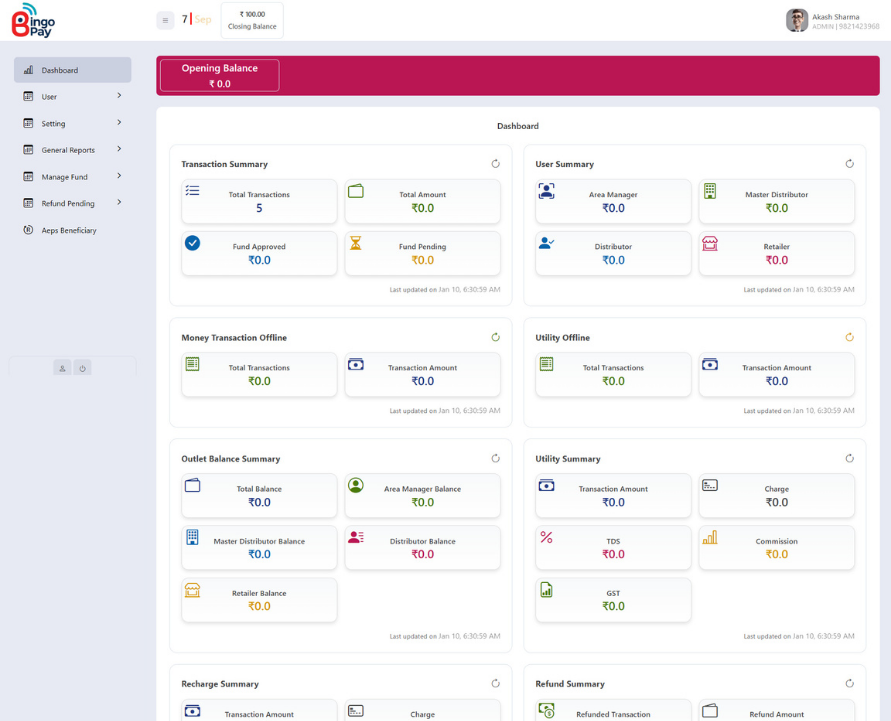
Transactions, funds, refunds and reporting in one dashboard.

One dependable platform for everyday organisational workflows.
ANC registration, high-risk tracking and follow-ups.
Clouds and tools we work with.
The major clouds and standard, well-supported tools, no proprietary lock-in.
 AWS
AWS Azure
Azure Google CloudCloudflare
 Docker
 Kubernetes
 TerraformNginx
Common questions.
Something else on your mind? Ask us directly. A real person will reply.
Ask a questionWhich cloud provider should we use?
It depends on your existing tools, team skills and requirements. We work with AWS, Azure and Google Cloud and will recommend the one that fits, not the one we prefer.
Can you reduce our cloud bill?
Often, yes. Idle resources, oversized servers and missing auto-scaling are common. We start with a cost review so you can see where the money goes.
Do we need Kubernetes?
Not always. For many teams simpler container hosting is easier and cheaper. We recommend Kubernetes only when it genuinely helps.
Can you manage our infrastructure ongoing?
Yes. We can run monitoring, patching and incident response for you, or set things up and hand over to your team.
Will migration cause downtime?
We plan migrations to keep downtime minimal, often to a short, scheduled window, with a tested rollback plan.
Have an idea? Let’s build it properly.
Tell us where you want to go. We’ll come back within one business day with a clear next step.